How JavaScript Really Works Under the Abstractions We Rely On
How Understanding What’s Under the Hood Makes You a Better Engineer
As developers, we spend most of our time in the “Top Layer” of the frontend, relying on built-in methods like map, filter, and forEach. Usually, these abstractions are perfect. They let us write clean, readable code without worrying about what’s happening in the engine.
But as applications scale, abstractions eventually leak.
You might notice it when a simple forEach fails to handle a high-concurrency async task, or when you find yourself wondering why a primitive string, which technically isn't an object, somehow has access to a library of methods like .split().
To build resilient systems, we have to occasionally dive below the surface. Today, we’re tracing the thread from the fundamental mechanics of the Prototype Chain to the complex world of Async Concurrency Managers.
The "Everything is an Object" Paradox
Let’s start with a foundational paradox: the "Everything is an Object" claim. In JavaScript, strings are primitives. If you check typeof "Ozz", it’s a "string". By definition, primitives are just values; they don’t have properties or methods. Yet, we call .toUpperCase() on them every day.
To understand any of this, we first have to answer: what actually is a Prototype? In JavaScript, every object has a hidden property that points to another object. This "other object" is the Prototype. Think of it as a fallback system. If you ask an object for a property or method it doesn't have, it doesn't give up; it looks at its Prototype to see if it’s there.
A Practical Scenario: The Wasted Memory Trap
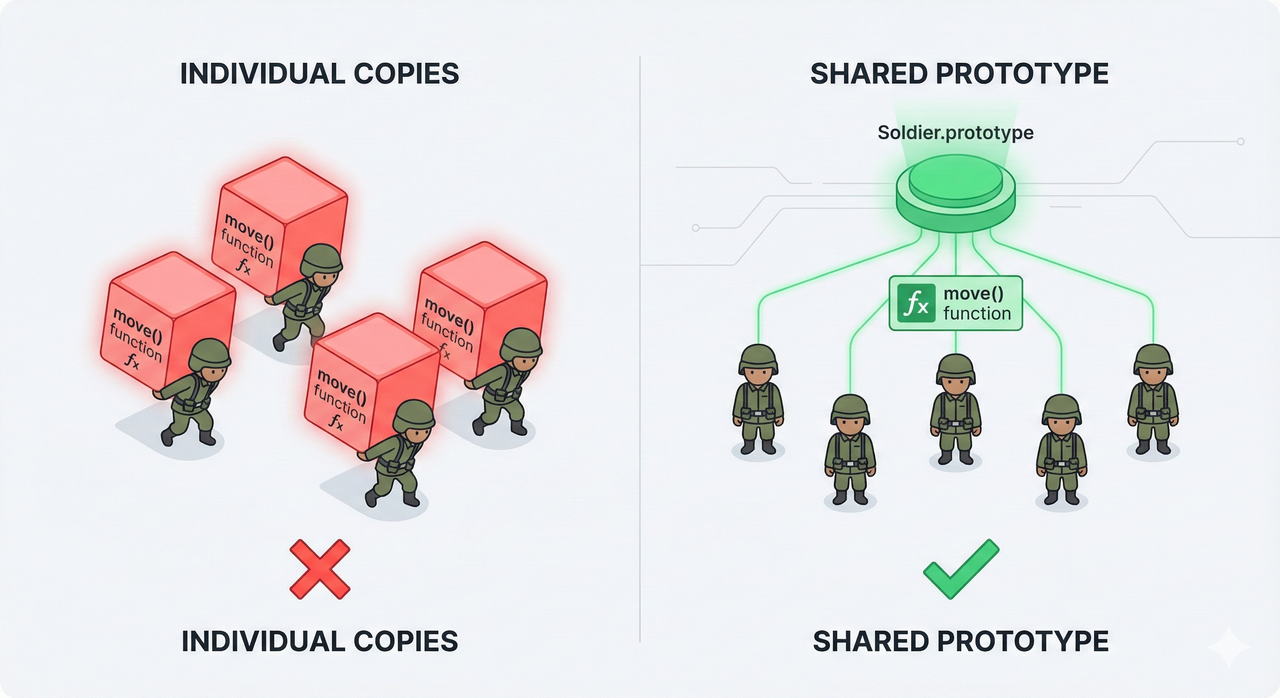
To see why this "fallback" is so important in the real world, let’s look at a classic problem. Imagine you are building a game with 1,000 "Soldier" objects. Each soldier needs a move() function. If you define the function inside the constructor, like this:
function Soldier() {
  this.move = function() {
    console.log("Moving...");
  };
}
const s1 = new Soldier();
const s2 = new Soldier(); // ... 1,000 times
If you do this, the computer creates 1,000 different copies of the move function in memory. That is incredibly wasteful because every soldier moves the exact same way.
The Solution: The "Master Object" (Prototype)
Instead of giving every soldier their own copy of the function, JavaScript says: "Let’s put the function in a single 'Master Object' and let all soldiers look at it when they need it." This "Master Object" is the Prototype. It acts as a shared library that every instance can access without owning its own copy.
How it Works: The Mechanics of Delegation
Every object in JavaScript has a hidden "link" (internal property) called [[Prototype]] (commonly accessed via __proto__). When you ask an object for a property (like s1.move), the JavaScript engine follows these steps:
Look at the object itself: "Do you have a
moveproperty?"Look at its Prototype: If not found, it follows the hidden link to the parent. "Do you have it?"
The Chain: If the parent doesn't have it, it looks at the parent's parent.
The End: This continues until it hits
null(the end of the Prototype Chain).
prototype vs __proto__: Two Sides of the Same Coin
This is where most people get confused. They are related but serve different roles:
prototype: This is a property on Constructor Functions (likeArrayorSoldier). It is a "Blueprint" for what future children should look like.__proto__: This is a property on the Instances (the children). It is the actual "Link" pointing back to the blueprint.
function Soldier() {}
// We add the function to the BLUEPRINT once
Soldier.prototype.move = function() {
  console.log("Walking...");
};

const s1 = new Soldier();
s1.move(); // It works!
console.log(s1.__proto__ === Soldier.prototype); // true
The Primitive Paradox: Values Without Links
Now we hit the mystery. If a Prototype link is created by a Constructor function (like our Soldier), what happens to a simple string? When you write const name = "Ozz";, you aren't using a constructor. You're creating a primitive. Primitives are raw data; they don't have a __proto__ link. Technically, they should be "methodless."
The "Auto-Boxing" Mechanism
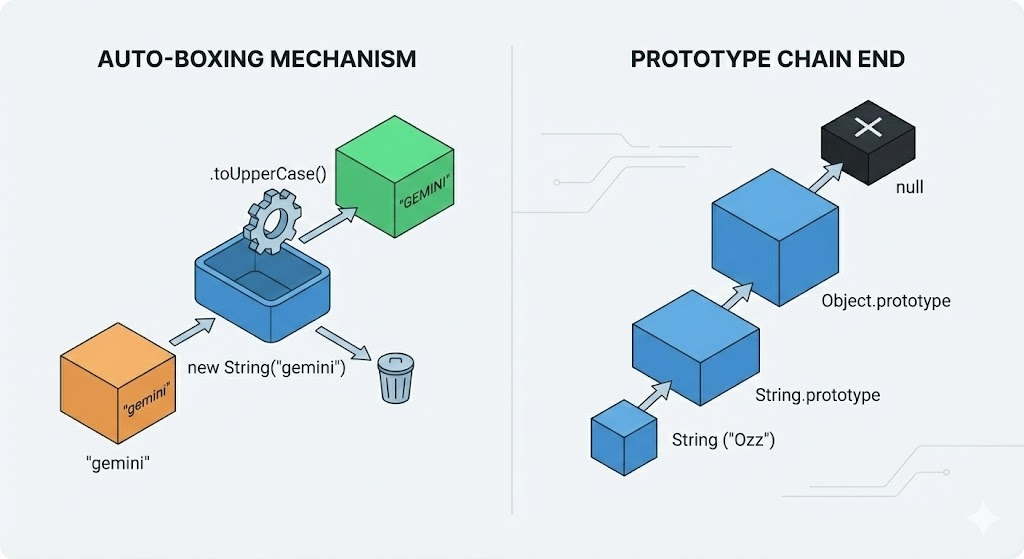
The moment you try to access a property or method on a primitive (like .toUpperCase()), JavaScript performs a magic trick called Boxing:
It creates a temporary Wrapper Object (e.g.,
new String("gemini")).This wrapper object has access to
String.prototype.It runs the method you asked for.
It returns the result and immediately throws the wrapper object away.
The Prototype Chain "End"
When people say "Everything is an object," they mean that if you follow the prototype chain far enough, almost everything eventually points back to Object.prototype.
A String points to
String.prototype.String.prototypepoints toObject.prototype.Object.prototypepoints tonull.
This is why a String can use .toUpperCase() (from its own prototype) and .hasOwnProperty() (from the Object prototype).
Mastering the Blueprint: The Prototype in Action
Building Our Own forEach
Understanding that these methods aren't hardcoded into the data but live on a shared blueprint allows us to stop being passive users of the language and start being creators. To demystify this, let’s try to implement our own version of forEach directly on the Array.prototype. This exercise forces us to confront the this keyword - the bridge that connects the shared blueprint back to the specific data instance we are looping over.
Extending the Array Prototype
By adding a method to the prototype, we are effectively teaching every array in our codebase a new trick. Notice how this inside the function refers to the specific array instance that called the method.
Array.prototype.myForEach = function(callback) {
  // 'this' refers to the actual array instance
  for (let i = 0; i < this.length; i++) {
    callback(this[i], i, this);
  }
};

[10, 20, 30].myForEach((item) => console.log(item));
The Abstraction Leak: When Synchronous Loops Fail
While extending prototypes is a great way to learn how the engine works, it also reveals a significant limitation: the built-in "blueprints" were largely designed for synchronous operations. In a modern environment, we rarely deal with simple lists of numbers; we deal with streams of data and network requests.
Beyond the Prototype: Scaling for Concurrency
The Async Problem: forEach and the Event Loop
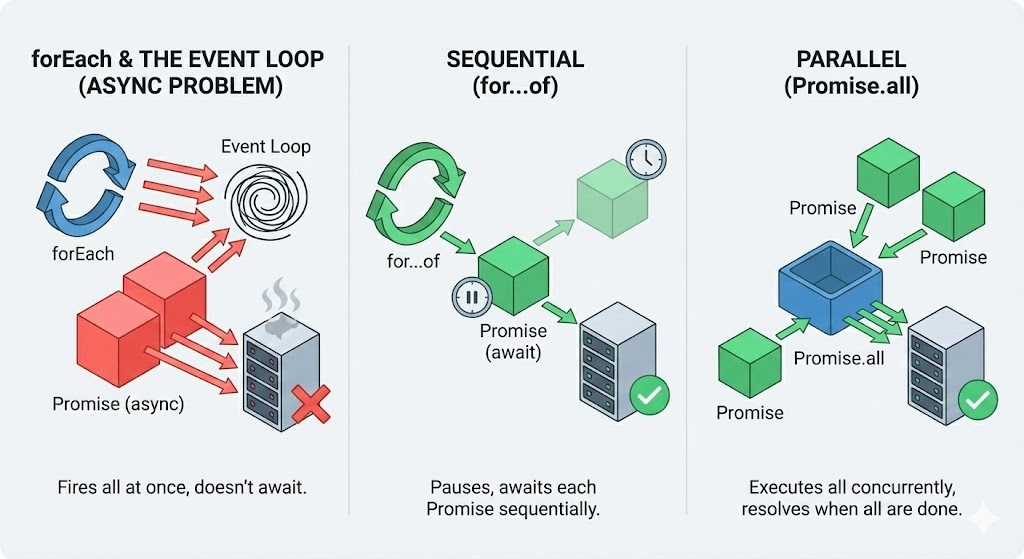
This is where the "Abstraction Leak" I mentioned earlier becomes a real pain point. If you use a standard forEach with an async callback, you quickly realize it doesn't actually "await" anything. It's designed to fire all callbacks as fast as possible in a single synchronous sweep. It doesn't care about the Promises you return, which means if you're trying to fetch 100 resources, you're firing 100 requests at the exact same time.
What Actually Works: The for...of Loop
The simplest way to fix the forEach issue is to switch to a for...of loop. Unlike forEach, the for...of loop respects the await keyword inside its body. It will pause the execution of the loop until the current Promise resolves before moving to the next iteration. This ensures your tasks run sequentially—one after the other.
const processTasks = async (tasks) => {
  for (const task of tasks) {
    // The loop stops here until this promise resolves
    await task();
  }
};
The Speed Alternative: Promise.all
But what if you don't want to wait for one task to finish before starting the next? If you have 10 independent API calls, running them sequentially with for...of is a waste of time. This is where Promise.all comes in. It takes an array of promises and executes them in parallel, returning a single promise that resolves when all of them are done.
Choosing the Right Tool
While Promise.all is incredibly fast, it’s a "heavy lifter." It fires everything at once. If you are dealing with 1,000 tasks, Promise.all might overwhelm the browser or the server. Understanding the difference between the sequential for...of and the parallel Promise.all is the key to choosing the right strategy for the right scale.
Conclusion
We started this journey by asking why a simple string can use methods, and we ended by discussing the nuances of async execution. This is the power of understanding the "under the hood" mechanics of JavaScript. When you understand the Prototype, the Constructor, and Boxing, you stop seeing the language as a collection of magical keywords and start seeing it as a system of blueprints and links.
Comments
Join the discussionNo comments yet. Be the first to comment.


